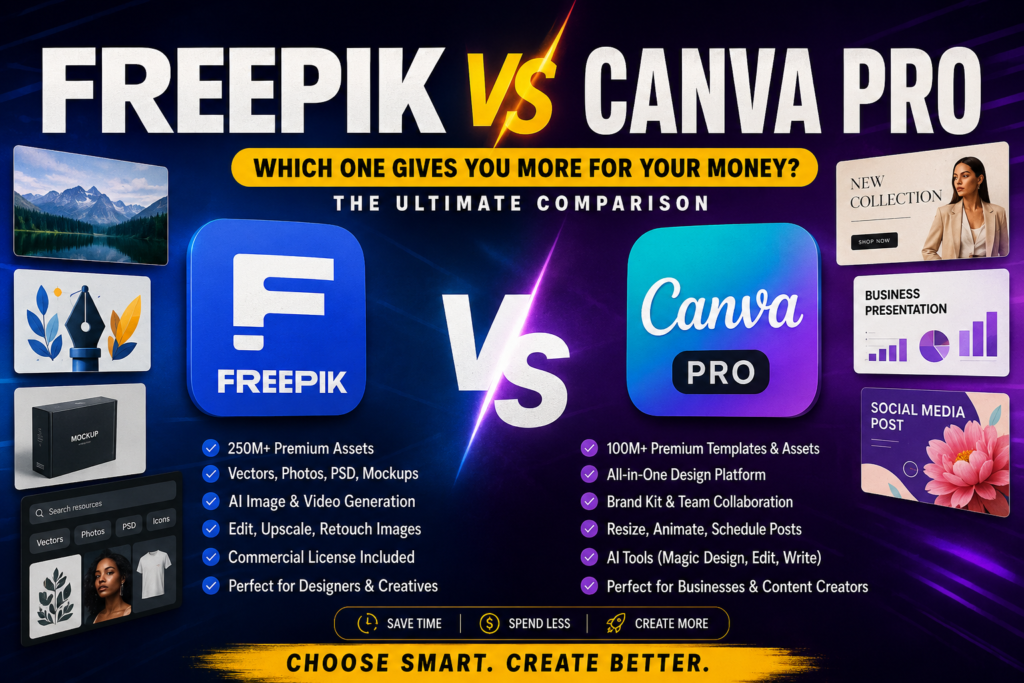
The modern creator is no longer looking for a design tool that can simply add text to an image. Today, people want one platform that can generate ideas, create professional visuals, remove backgrounds, edit videos, maintain brand consistency and reduce the number of hours spent designing.
That is why the debate between Freepik and Canva Pro has become more interesting.
At first glance, both platforms appear to offer similar things. They provide premium images, templates, artificial intelligence tools and resources for content creation. However, they approach creativity from very different directions.
Canva Pro is designed to help you move quickly from an idea to a completed design. Freepik offers a deeper collection of creative assets and more specialised tools for generating, editing and enhancing visuals.
So, which platform actually offers better value?
The answer depends on the kind of creator you are and what you expect your subscription to accomplish.
Canva Pro Is the Complete Design Workspace

Canva Pro is built for speed, accessibility and convenience.
It allows users to create social media posts, presentations, flyers, documents, videos, advertisements, logos and several other types of content inside one workspace. Its drag and drop editor makes the platform approachable, even for people with little design experience.
Canva Pro also gives users access to more than 100 million premium photos, graphics, videos, fonts, audio tracks and other creative assets. Because these resources are integrated directly into the editor, users can search for an image, place it in a design and continue editing without downloading files or switching applications. (Canva)
This makes Canva Pro especially valuable to business owners, students, marketers and social media managers who need to produce finished content regularly.
With Canva Pro, the process is straightforward. Choose a template, replace the existing content, apply your brand colours, add your images and export the finished design.
You do not need to master complicated professional software before producing something presentable.
Freepik Gives Creators More Visual Freedom
Freepik takes a different approach.
Instead of concentrating mainly on assembling complete designs, it gives creators access to a massive library of visual materials and advanced creative tools.
Its premium offering includes more than 250 million photos, videos, vectors and PSD files. It also provides access to AI image, video and audio models, professional editing tools, mockup resources, commercial AI licensing and advanced image and video upscaling. (Magnific)
This makes Freepik particularly attractive to graphic designers, video creators, photographers, agencies and people who need distinctive visual assets.
A designer may visit Freepik to find an editable vector illustration. A photographer may use its enhancement tools to improve image quality. A content creator may generate a custom visual, remove its background and transform it into a video.
Freepik gives you more of the ingredients needed to create original work. Canva Pro focuses more heavily on helping you arrange those ingredients into a finished product.
The Battle of the AI Tools
Artificial intelligence has changed the value of both platforms.
Canva AI functions as a conversational creative assistant. It can help users visualise ideas, generate text and produce designs within Canva’s existing workspace. The biggest advantage is that users can move directly from an AI generated concept into a social post, presentation, document or marketing design. (Canva)
Canva’s 2026 AI developments have also expanded its capabilities in areas such as conversational design, intelligent editing, scheduling, brand intelligence, web research, spreadsheet assistance and code creation. (Canva)
Freepik provides a broader AI production environment.
Its tools allow users to generate images, videos, audio and icons from written prompts. Users can also edit, upscale, enhance, restyle or remove backgrounds from existing visuals. Freepik’s creative suite includes image generation, video generation, image editing, video editing and audio production tools. (Magnific)
The difference is easy to understand.
Canva AI is stronger when your goal is to create a complete piece of content quickly.
Freepik is stronger when you want to create, improve or manipulate the individual visual elements that will be used in that content.
For example, someone creating an Instagram advertisement could use Freepik to generate a detailed product image and use Canva Pro to arrange that image alongside the headline, price, logo and contact information.
Which Platform Has Better Templates?
Canva Pro is usually the stronger choice for ready to use templates.
Its template system is designed for people who want to create finished materials quickly. You can select an Instagram post, presentation, flyer or video template and customise it without leaving the platform.
The templates are organised around practical needs, making Canva especially useful for everyday business and social media content.
Freepik also offers templates, but its real strength lies in the variety and depth of its creative assets. Its collection includes vectors, PSD files, illustrations, photographs, mockups and other resources that may require more detailed customisation.
Canva gives you a nearly finished structure.
Freepik gives you materials that can help you create something more distinctive.
Therefore, beginners and people working under tight deadlines may prefer Canva. Designers who want greater control may find Freepik more useful.
Which One Is Better for Branding?
Canva Pro has a strong advantage when it comes to maintaining a consistent visual identity.
Users can store brand colours, fonts, logos and other visual elements, then apply them across different designs. This makes it easier for businesses to create content that looks connected, even when several people are producing the materials.
Canva also positions itself as an integrated visual communication platform for businesses that need to create content quickly and maintain brand consistency. (Canva)
Freepik can help a brand develop impressive visual elements, including custom images, product mockups, illustrations and campaign assets. However, it is less focused on managing a full brand system across everyday content.
For creating unusual branded visuals, Freepik may be the stronger option.
For maintaining consistent colours, layouts, logos and fonts across several posts, Canva Pro is more convenient.
Which One Saves More Time?
Both platforms save time, but they save it in different ways.
Canva Pro saves time by simplifying the entire design process. You can choose a template, customise it and publish the finished work without moving between several programs.
Freepik saves time by giving users access to ready made resources and powerful AI tools. Instead of drawing an illustration, building a mockup or creating a visual from the beginning, you can find or generate what you need.
Imagine that you need to create five promotional posts.
With Canva Pro, you can create one branded layout, duplicate it and replace the information in each version.
With Freepik, you can quickly source or generate five different premium visuals to make those posts more attractive.
Canva speeds up production.
Freepik speeds up visual creation.
Which Platform Is Easier to Use?
Canva Pro is generally easier for beginners.
Its tools are presented in a simple and familiar way. Users can drag, drop, resize and replace elements without understanding complicated design processes.
Freepik offers more specialised creative possibilities, but getting the best results may require stronger prompting skills, knowledge of image composition or an understanding of file formats.
Some Freepik assets are designed for further editing, which may be more suitable for people already familiar with design software.
This does not mean that Freepik is difficult. It simply offers more room for experimentation, which can require more creative decision making.
Canva is designed to guide you.
Freepik is designed to give you more freedom.
Freepik for Content Creators
Content creators constantly need fresh visual materials.
Using the same stock photographs and common templates can make a page look repetitive. Freepik helps creators discover or generate more original visuals for advertisements, thumbnails, social media posts and video content.
Its image and video generation tools can also help creators turn ideas into visuals without organising a professional photoshoot.
This gives Freepik an advantage for creators who care deeply about visual originality.
However, the finished content may still need to be arranged, branded and formatted. That is where Canva Pro becomes useful.
Freepik can help you create the visual.
Canva Pro can help you package it for your audience.
Canva Pro for Businesses and Social Media Managers
Businesses need more than attractive pictures. They need a consistent system for producing content.
Canva Pro makes it easier to create promotional posts, presentations, proposals, advertisements and internal documents without employing a professional designer for every small task.
Social media managers can also create different versions of one design while maintaining the same visual identity.
For a small business that regularly produces marketing content, Canva Pro may provide more practical everyday value.
It reduces the distance between having an idea and publishing it.
What About the Price?
The cheapest platform is not automatically the one that gives you better value.
A tool offers good value when it helps you complete the work you actually do.
Paying for Canva Pro may be worthwhile when you frequently create finished social media posts, presentations, flyers and branded materials.
Paying for Freepik may make more sense when your work depends on premium stock resources, vectors, PSD files, mockups, AI generated images or advanced visual enhancement.
Freepik’s paid plans currently combine stock resources with credit based AI features, while higher plans offer larger allowances and broader access. Canva’s paid plans focus on premium content, increased AI access and additional tools for individual and business workflows. (Canva)
Your decision should therefore be based on your workflow, not just the subscription figure.
Who Should Choose Canva Pro?
Canva Pro is the better choice for business owners, students, social media managers, marketers and beginners who want to create complete designs quickly.
It is also ideal for anyone who wants templates, branding tools and a simple editor in one place.
When speed, consistency and ease of use matter most, Canva Pro is difficult to beat.
Who Should Choose Freepik?
Freepik is the better choice for graphic designers, photographers, video creators, creative agencies and people who need a wider selection of premium visual assets.
It is especially useful for users who want AI image generation, video generation, upscaling, mockups, vectors and editable creative files.
When originality, visual depth and creative control matter most, Freepik offers greater flexibility.
The Final Verdict
Canva Pro and Freepik are not direct replacements for each other.
Canva Pro is a complete design workspace. It helps you arrange ideas, text, images and branding into finished content.
Freepik is a creative resource and production platform. It helps you discover, generate and improve the visual elements that make your work more impressive.
Canva Pro wins for speed, simplicity and complete design creation.
Freepik wins for premium visual resources, AI production and creative flexibility.
For many creators, the smartest solution may be to use both platforms together.
Create or source your standout visuals with Freepik. Then bring those visuals into Canva Pro, add your branding and transform them into polished content.
With K Sub Share, accessing the premium creative tools you need can be more affordable. Spend less time struggling with limited resources and more time creating work that gets noticed.